AI tokens are the small chunks of text an AI model actually reads and writes.
Not words. Chunks.
A token might be a whole word, part of a word, a punctuation mark, or even a space. A familiar word like “presentation” may fit neatly into one token. A rarer word like “Croonquist” may get chopped into several pieces (costing 3 tokens to process instead of 1).
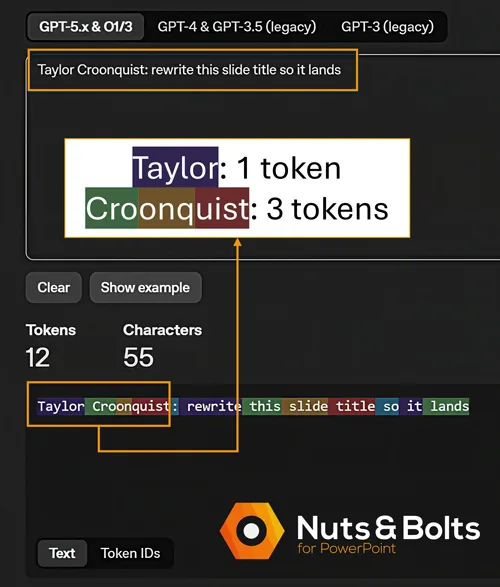
Yes, that means my own last name is more expensive to feed an AI than the word “presentation.”
As a rule of thumb, one token is about three quarters of an English word, so 100 tokens works out to roughly 75 words.
To try this out for yourself, visit OpenAI's Tokenizer and type in whatever text you want to test out.
Now for the part most explainers skip: most everyday AI users have never bought a token in their lives. You generally do not receive a consumer AI bill listing 14,372 tokens. Your plan meters you in messages, usage limits, or credits instead — more on those meters below.
So why care about a unit you rarely see?
Because tokens are one of the meters behind the meter. They help determine how much information the AI can handle at once, how long a conversation can become, and how much capacity a request consumes.
You may never see the token counter, but long conversations, enormous file uploads, and unnecessarily wordy instructions can fill it. Once you understand that hidden meter, those “you’ve reached your limit” messages start to feel a lot less mysterious.
What is an AI token?
An AI token is the basic unit of data an artificial intelligence model uses to process and generate text. Depending on the word and the model, a single token can be a whole word, a syllable, a single character, or even a blank space. As a general rule, one token equals approximately four characters or three-quarters of a standard English word.
And tokens count in both directions. Everything you send is input: your prompt, plus the conversation history, attached files, and instructions riding along behind the scenes. Everything the model writes back is output. At the rates developers pay, output tokens usually cost several times more than input tokens, because generating text takes more computing power than reading it.
Keep that two-way meter in mind — it explains most of what follows.
How tokens are counted (and why every AI counts them differently)
Before an AI model reads your prompt, a tokenizer breaks the text into chunks and assigns each chunk a number. The model works with those numbers. It does not see letters and words the way you do.
A token can be a whole short word, part of a longer word, punctuation, or a chunk that includes a space. Common words often fit into one token. Unusual names, technical jargon, and unfamiliar combinations may get split into several.
Punctuation affects the count. Spaces affect the count. Formatting affects the count.
OpenAI’s own rule of thumb for English: one token is about four characters, or three quarters of a word. Using that estimate, a 500-word document contains roughly 670 tokens. It is a useful approximation, not an exact exchange rate.
The same sentence can have different token counts
There is no universal tokenizer shared by every AI model.
The same sentence can produce one token count in an OpenAI model and another in Gemini or Claude. Google estimates that 100 Gemini tokens equal approximately 60 to 80 English words, while OpenAI and Anthropic both use roughly 75 words as a general estimate.
Token counts can even change between two models made by the same company. Anthropic currently warns that some newer Claude models use a newer tokenizer that produces roughly 30% more tokens for the same text than the tokenizer used by some earlier Claude models.
Same sentence, different meter reading.
While researching this post, we asked ChatGPT, Claude, Gemini, and Copilot to explain their own tokens. Their answers sounded like four coworkers describing the same office printer. ChatGPT reached for Scrabble tiles. Claude called tokens “the model’s currency and its alphabet at the same time.” Gemini told a Goldilocks story about why chunks work better than individual letters or whole words.
They disagreed on the garnish. But on the basic mechanics, they all landed in the same place: for text, chunks go in, chunks come out, and all of it gets tokenized.
Why is the token meter so hard to see?
Here is a fact that surprised me while fact-checking this post: most consumer AI plans do not show you a running token total.
Instead, every company puts its own meter on top.
ChatGPT talks about message caps and model allowances. OpenAI says Plus users can send up to 160 messages every three hours with GPT-5.5 Instant before chats switch to a smaller model until the limit resets.
Claude is more complicated. Anthropic gives subscribers five-hour session limits and weekly limits, but it does not promise that every message costs the same amount. A short question may barely move the meter. A long conversation with attached files, web searches, and more demanding models can use considerably more of your allowance.
Microsoft uses a mixture of AI credits and feature-specific caps. One action might deduct a credit. Another feature might give you a certain number of uses or minutes per day. Gemini, for its part, meters access through “compute-based usage limits.”
Different companies, different costumes. Those labels are not interchangeable, and none of them gives the average user a simple running token total.
Tokens are one important part of what sits behind those visible limits. Longer prompts, larger files, growing conversation histories, and longer answers all require the model to process more tokens. More demanding models and tools may require additional computing power too. There is no simple rule saying one message always equals one fixed number of tokens, credits, or dollars.
And the meter does not just hide. It moves.
In July 2026, Anthropic stopped including Claude Fable 5 in its $20 Claude Pro allowance. Pro subscribers could still use the model, but only by purchasing usage credits charged separately from the subscription. Nothing about the plan’s price changed. What the plan included did.
I learned this lesson on my own bill.
I was already paying $100 a month for Claude when one bill suddenly arrived at $122. At some point, I had enabled additional usage credits, and I had not fully understood how easily those extra charges could accumulate.
I thought I understood my usage. The meter still caught me, because the meter is invisible.
Some plans let you switch on extra metered usage with one click — and it stays on until you turn it off. If your AI bill is bigger than your subscription price, check that setting first.
Why? Because I could see the subscription price. I could see the messages I was sending. But I could not easily see the machinery connecting one to the other.
That is why tokens matter even when your AI tool never shows you a token counter. They help explain why one request barely touches your allowance while another makes the meter move much faster.
How much does a typical AI task actually cost?
The comparison you will find in most token explainers goes something like this: one million tokens equals about ten novels.
True, and useless.
Nobody has ever dictated ten novels into a chatbot, and if you have, we should talk.
The question you probably have is more practical: how much AI does an ordinary work task actually use?
Consumer subscriptions do not reveal that math, so the closest public yardstick comes from API pricing — the published rates software developers pay when they use an API to build AI into their own products.
API prices change frequently and vary widely by model, so treat the numbers below as a dated snapshot of the general scale, not a price list.
As of July 2026, one of OpenAI’s higher-priced text models charged $5 per million input tokens and $30 per million output tokens. Using that model as a deliberately expensive yardstick:
Generating a full page of text, about 500 words, would cost roughly 2 cents.
Creating a 600-word outline for a presentation would cost about 2 to 3 cents.
Reading a 7,500-word meeting transcript would cost about 5 cents, plus another cent or two for a short written summary.
Rewriting the text on one dense PowerPoint slide would cost a fraction of a cent.
An ordinary text task often costs pennies at published API rates, not dollars. That helps explain how companies can bundle a large number of everyday AI interactions into a flat monthly subscription — though it does not mean your $20 plan contains exactly $20 worth of tokens. Consumer subscriptions bundle model access, tools, product features, and capacity under rules the company controls.
Microsoft has already started translating this same idea into workplace billing. Its Copilot Cowork service uses Copilot Credits and estimates usage through light, medium, and heavy tasks. A short task using limited information consumes less than a multi-step task that searches many sources, reasons through them, and produces several outputs. Microsoft is not simply charging employees for the visible words on the screen. It is measuring the size of the job.
That is the part worth remembering: a short prompt does not necessarily mean a small request. A long conversation, a stack of attached files, deep reasoning, or several tool calls can make one innocent-looking message considerably heavier behind the scenes.
And at company scale, the pennies add up. One summary may cost almost nothing. Thousands of employees running thousands of summaries, searches, agents, and document reviews create a very visible invoice. One Reddit user at a billion-dollar tech company put it this way:
“After about 6 months and thousands of dollars in tokens across the entire company, we still don’t have a single work flow or use case we can consistently turn to AI for. It makes too many mistakes and takes too long.”
That was posted in an anti-AI community, so it deserves a healthy dose of salt, but the billing math is real: multiply invisible meters across a whole org and you get very visible invoices.
The exact model names and prices will change. The underlying math will not: more information in, more work performed, and more information out generally require more computing capacity.
What happens when the AI runs out of room?
Every AI model has a context window: the amount of information it can work with at one time.
Depending on the tool, that space may need to hold:
Your current prompt
Earlier messages in the conversation
Attached files and pasted drafts
Information returned by searches or other tools
The answer the AI is about to write
When all that material exceeds the available room, something has to give. The tool may reject the file, leave out part of the document, summarize older messages, retrieve only the sections it considers relevant, or begin losing track of details from earlier in the conversation.
There is also a separate limit on how much the AI can write back in one response. That means a long transcript might fit inside the context window while the requested answer still gets cut off. Asking for an exhaustive summary of a 200-page transcript may require more output than the model can produce at once.
The available room varies by model, plan, file type, and product. The enormous context-window numbers advertised for some models do not guarantee that every consumer chat, uploaded file, or response can use the full amount.
For very long material, divide the job:
Summarize the transcript in sections.
Save each section summary.
Start a fresh chat with the shorter summaries.
Ask for one final combined summary.
You are replacing one overloaded desk with a manageable stack of assignments.
Where token burn takes off
Individual tasks may cost pennies at published API rates. So how did my bill jump by $22? How does a company burn through thousands?
Multipliers.
Here are the big ones, roughly in the order they tend to bite people who build presentations, documents, and other office content for a living.
1. Long chats get heavier (costing more tokens)
This is the one almost nobody knows.
For the AI to continue a conversation, it needs access to what came before: your earlier questions, its answers, pasted drafts, attached material, and sometimes the results returned by other tools.
That means message 40 in a marathon chat may require far more context than message four, even when your newest prompt is only one sentence.
The exact mechanics vary. Some AI products cache repeated material, summarize older messages, retrieve only relevant information, or remove earlier content when the conversation becomes too large. But the practical result is the same: long conversations can use more of your allowance than fresh ones.
That endless everything-chat you keep alive for weeks, the one you’ve had open since March, is the single most expensive habit in consumer AI.
You can hear the moment people discover this one. A Claude user on Reddit, mid-meltdown:
“My five-hour usage limit jumps from 0% to 100% immediately... 98% of my limit is being consumed due to exceeding the 150k context.”
That is multiplier #1 in the wild: the chat itself got so heavy that a single question maxed the meter.
2. Blank PDF pages still cost 1,500+ tokens per page
This one surprised me enough that I measured it with Claude’s own token-counting tool.
On August 5, 2026, I uploaded a completely blank, one-page PDF. Nothing on it. Not one word.
Claude still counted 1,579 input tokens (1,592 including the prompt).
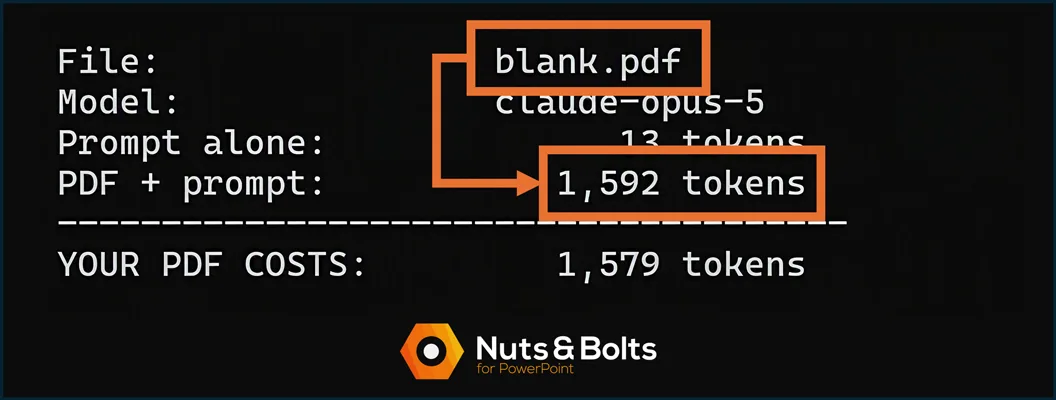
Why? Because Claude does not just look for text inside a PDF. It also turns each page into an image so it can inspect the layout, charts, formatting, and anything else visible on the page. Anthropic’s documentation confirms the mechanism: Claude extracts the text, converts each page into an image, and analyzes both together. That visual-processing cost applies even when the page is empty.
I saw the same pattern with real documents. A 408-word report required 839 tokens when pasted as plain text, but 2,433 tokens when uploaded as a one-page PDF. A 13-page document required 4,494 tokens as pasted text and 24,762 tokens as a PDF. In these tests, each PDF page added roughly 1,500 to 1,600 tokens of visual processing. The emptier the page, the worse the deal.
That does not mean every PDF in every AI tool follows this exact math — these were specific documents measured with one Claude model on August 5, 2026. But the practical lesson holds: when an AI reads both the text and a picture of every page, a PDF can consume considerably more tokens than the same words pasted directly into the chat.
The same logic applies to screenshots. A pasted image of a slide is processed as a picture, and larger images cost more tokens than smaller ones. Useful when you need feedback on the layout; wasteful when you only need the words.
That extra processing is worth paying for when you need the AI to inspect charts, slide layouts, scanned pages, or formatting.
⚡ Quick Tip When you only need help rewriting one paragraph, paste the paragraph. A Markdown file also preserves headings, bullets, and links without making the AI inspect a designed page visually.
3. Re-pasting the entire deck for one small edit
Every time you provide the full draft, the AI has to process that material again.
If you need help rewriting one slide, paste that slide. If you need help with one paragraph, paste that paragraph.
Do not hand the AI a 40-slide presentation every time you need six bullets tightened.
4. Attached files can remain part of the job
A large file does not necessarily disappear from the AI’s workload after the first answer.
Depending on the product, the file or relevant material retrieved from it may remain part of the conversation’s working context. Continue asking questions about it, and some or all of that content may need to be processed again.
This multiplier also stacks with the first one. A long conversation containing several large files can become heavy surprisingly quickly.
5. Agents and automated workflows may repeat the work
A normal chat waits for you to send the next message.
An agent may search, read a file, call another tool, evaluate what came back, revise its plan, and try again. One visible assignment can trigger several model requests and tool calls behind the scenes.
That does not automatically make agents wasteful. The extra work may be exactly what allows them to complete a complicated assignment. But it does mean that “one task” does not always equal “one request.”
This matters most for companies, developers, and anyone using metered credits or API billing. An automated workflow can repeat all the multipliers above while nobody is watching the meter.
6. The model thinks in tokens you never see
Newer “reasoning” models work through a problem in a hidden scratchpad before writing the answer you read. Those thinking tokens are real generated text, and both OpenAI and Anthropic bill them as output tokens — the expensive kind — even though you never read most of them.
A hard question can produce a short visible answer sitting on top of thousands of invisible reasoning tokens. In a consumer app there is no way to watch this happen; it simply draws down your allowance. That makes it maybe the purest example of the hidden meter: the model spends tokens thinking, and the only evidence is how fast your limit arrives.
One job, one chat: the habit that prevents most token burn
The defensive habit is almost embarrassingly simple: one job, one chat.
Finish the presentation outline. Start a fresh chat before moving to an unrelated email campaign.
⚡ Quick Tip When you need continuity, ask the old chat to create a short handoff summary and paste that summary into the new one. You keep the useful decisions without dragging the entire conversation behind you.
And when the AI only needs a small amount of text, give it the relevant excerpt rather than the entire file.
Chats are cheap. Start more of them.
Common questions about AI tokens
Q: Why are AI tokens important if I never buy them?
A: Tokens help shape many of the limits you actually feel: how long a conversation can get, how much information the AI can process at once, how quickly a file-heavy chat uses your allowance, and what metered AI usage costs behind the scenes.
They are not the only factor — your model, plan, tools, and the AI company’s own rules matter too. But knowing roughly how tokens are counted can mean the difference between a plan that lasts comfortably and one that mysteriously runs dry every second Tuesday.
Q: Do I need to buy AI tokens?
A: If you use ChatGPT, Claude, Copilot, or Gemini through a normal subscription, usually not. You buy a plan that gives you access under that company’s usage rules. Some services, including Claude, also let paid subscribers enable extra metered usage after reaching their included limits, which can create additional charges.
Developers see token pricing directly when they use an API key on an AI provider’s developer platform, where input and output are often priced per million tokens. If you have never created an API key, this probably is not you.
Q: Are AI tokens the same as crypto tokens?
A: No. Same word, completely different worlds. AI tokens are small chunks of text that a language model reads and writes. Crypto tokens are digital assets recorded on a blockchain.
Nothing in this post has anything to do with cryptocurrency. And no, your unused ChatGPT capacity is not an asset class.
Q: Why did I hit my AI limit so fast?
A: Users typically hit AI usage limits quickly due to four specific factors. First, keeping conversation threads open too long forces the AI to re-read the history with every new message. Second, uploading large files or complex PDFs requires massive token consumption to read. Third, selecting advanced models for basic tasks drains capacity unnecessarily. Fourth, using tools that perform hidden background searches or automated steps multiplies your token usage without you seeing it.
Key Takeaway: You may not see the token meter, but it's running
Tokens count the text you send, the text the AI writes, and the information it needs to carry through the conversation. You will probably never buy a bundle labeled “tokens.” You will feel them anyway.
The big things to remember:
Tokens are chunks of text, not whole words — and they count in both directions, what you send and what the AI writes back.
Different models may count the same text differently.
Long conversations become heavier as they carry more history.
Files, visual PDFs, hidden reasoning, and agents can multiply the work behind one request — in my Claude test, a PDF cost three to five times as many tokens as the same words pasted as text.
For small edits, paste only the section the AI actually needs. One job, one chat.
You do not need to count every token before sending a prompt. You just need to recognize the habits that make a simple request much larger.
Almost nobody looks under the hood of their AI subscription. The fact that you just did puts you ahead of nearly everyone you work with.
It is the kind of edge that gets the deck done and gets you to Happy Hour on time.
For more plain-English guides to the AI tools showing up in your workday, explore the full library on our tutorials page.
Prices, plan limits, and model behavior last verified: August 2026.
About the Author

Taylor Croonquist
Co-Founder, Nuts & Bolts Speed Training
Taylor Croonquist is a PowerPoint expert and trainer. Over a career spanning the globe, from consulting in New York and investment banking in China, Taylor has truly seen it all in PowerPoint. Through necessity and a natural tech savvy, Taylor honed his PowerPoint skills to the point of even blowing the minds of the Microsoft PowerPoint programming team. When he's not busy crafting PowerPoint training, you can find him reading a sci-fi series or scuba diving.